
Working with Child Grids
A child grid shows related records inline under a parent row — for example, Contacts inside Accounts, or Line Items inside Opportunities. This page is for end users. If you’re an admin configuring child grids, see Child Grids (configuration).
Expand a row to see its child records
- Look for a chevron (
>) icon on the left of each row. - Click the chevron to expand the row.
- The child grid appears inline with records related to that parent row.
- Click the chevron again to collapse.
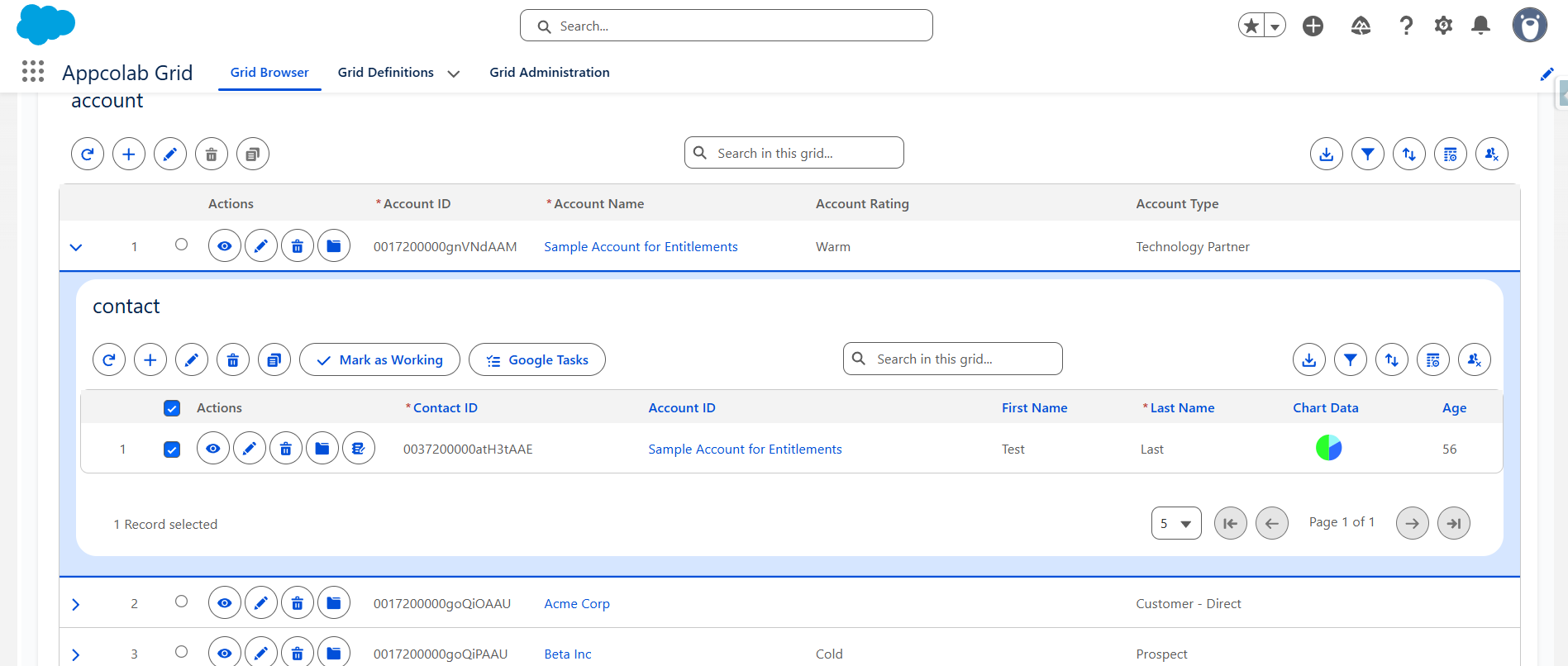
If no chevron is shown, this grid does not have a child grid configured.
Use a child grid like any other grid
Inside a child grid you can:
- Sort columns by clicking headers.
- Search and filter using the child grid’s own toolbar.
- Inline-edit cells (if editing is enabled).
- Run row or toolbar actions configured for the child grid.
- Expand further child grids — child grids can themselves have child grids.
Add a related record inline
If the child grid has Add Row enabled:
- Expand the parent row.
- Click Add Row in the child grid toolbar.
- A new row appears with the parent lookup auto-populated and locked. For example, when adding a Contact inside an expanded Account,
AccountIdis already set to that Account. - Fill in required fields and Save.
This is the fastest way to add related records — no need to navigate to the parent and then create a new child.
Bulk-edit child records
- Enter Edit Mode inside the child grid.
- Edit multiple cells across multiple rows.
- Click Save to commit all changes for that parent.
- Changes you make in a child grid do not affect other expanded rows.
Tips
- You can have multiple parent rows expanded at once.
- Collapsing a parent row keeps the child grid’s state (your sort, filters, etc.) for when you re-expand it.
- If a parent record has many related children, consider filtering inside the child grid to focus on what matters.